
Cadence - Event Experiences
Event Cadence, Inc.Events
3.79.00 Reviews
- Version
- 2.7.442
- Installs
- 10.00K
- Age Rating
- Everyone
Screenshots
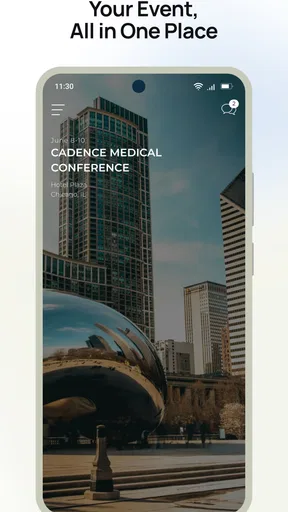
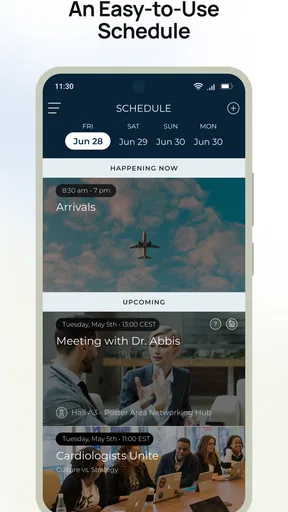
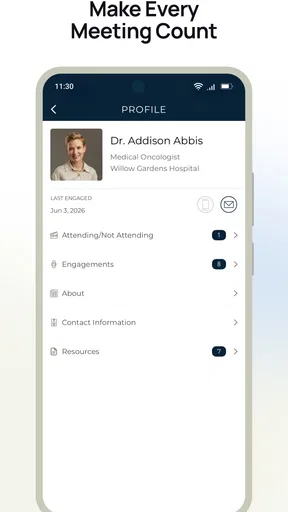
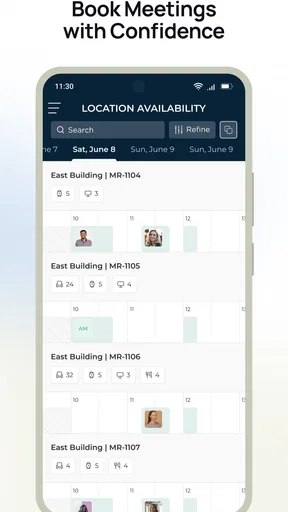
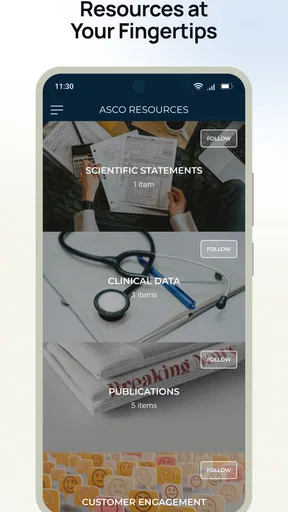
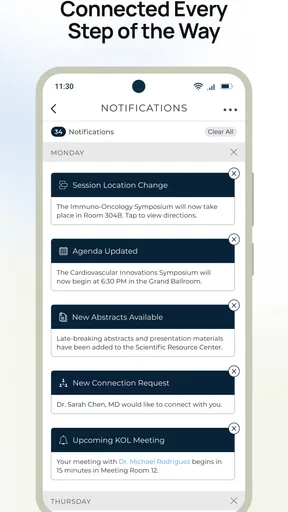
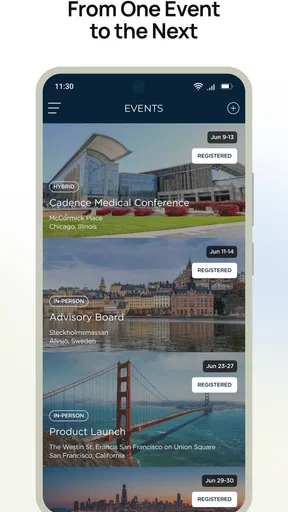
Our Review of Cadence - Event Experiences
 Analysis by Appyee
I approached Cadence - Event Experiences as an event companion rather than a general social network or a full planning suite. That distinction matters. Event apps can be genuinely useful when they put schedules, practical details, and on-site information in one place, but they can also become frustrating if the interface is hard to read or if the experience assumes every attendee uses a phone in the same way. My overall impression is that Cadence is most appealing when an organizer has already built an event around it and attendees want a focused way to follow what is happening.
It is a free events app from Event Cadence, Inc., with an Everyone age rating. It has reached over ten thousand installs and holds an average rating of 3.7 from roughly forty ratings, with fewer than ten written reviews. Those figures suggest a small but real user base rather than a widely established mainstream platform, so I would judge it primarily by whether it fits the particular event I am attending, not by popularity alone.
How Cadence feels when the event is busy
The central promise is simple: keep event-related information close at hand instead of making attendees search through email threads, printed programs, or several unrelated websites. In practice, that can make a difference during a conference, organized gathering, or other scheduled experience where the useful information changes depending on the moment. I found the idea more valuable in motion than at home. When I am sitting down and have time to plan, a browser or calendar can be enough. When I am moving between activities, a dedicated event app makes more sense.
That usefulness depends heavily on the event setup. Cadence is not a magic source of information by itself; its value comes from the content attached to the event. If an organizer keeps the schedule and practical details current, the app can reduce the need to remember everything. If the event information is incomplete or poorly arranged, the app cannot compensate for that. This is an important trade-off for attendees: the application may be free, but the quality of the experience is tied to the work done behind the scenes.
The current version is 2.7.442, and the app supports Android 7.0 and later. That broad operating-system reach is helpful for people who keep an older phone, especially in group settings where not everyone upgrades devices frequently. I would still install it before the event rather than waiting until arrival. Doing so gives me time to check whether the event opens correctly, understand the navigation, and avoid dealing with setup while surrounded by noise, queues, or a weak connection.
Readability and navigation: useful when information is organized well
My first test with an event app is not whether it looks impressive. I want to know whether I can answer three questions quickly: what is happening now, what comes next, and where do I need to go? Cadence is best judged by that practical standard. A focused event experience can be easier to follow than a long email because the information is presented in the context of the event rather than scattered across messages.
For readers who need larger text or more time to scan, I would recommend checking the interface before the event begins. System text enlargement can help on many phones, but enlarged text may also change how much information fits on screen. That creates a useful but sometimes awkward compromise: bigger writing improves legibility, while compact schedules reduce scrolling. I would not assume that every screen remains equally comfortable after changing display settings.
A good personal workflow is to open the event while calm, identify the main schedule area, and note the labels used for sessions, locations, or updates. Once I know where those elements live, I do not have to explore every screen during the busiest part of the day. This is one of the less obvious advantages of testing early: the app becomes a reference tool instead of another thing I need to learn while trying to participate.
Cadence also makes more sense for people who prefer one event context at a time. A general calendar is excellent for appointments spread across work, family, and personal commitments, but it can make an event schedule look like just another series of entries. A dedicated event application can preserve the relationship between activities and the event itself. The downside is that I would not use it as my only calendar. I still want important times copied into the calendar I already trust, particularly if I need reminders before leaving home.
For someone with low vision, the key question is whether the event content remains understandable without relying only on small visual distinctions. I would look for clear wording and predictable navigation rather than assuming color, icons, or position will be enough. Because event information can be time-sensitive, a screen that requires careful visual comparison is more tiring than one that states the relevant detail plainly. Cadence may be convenient, but I would pair it with the phone’s own display and speech settings where those are useful.
Motor and sensory considerations during real use
Event apps are often used one-handed, while walking, carrying a bag, or standing in a crowded room. That changes what counts as good design. I value short paths to the information I need and screens that do not require precise tapping. Cadence is most practical when I can open it, orient myself, and read the next relevant detail without a long sequence of gestures.
People with limited dexterity may want to prepare a small set of actions in advance. I would open the event, find the schedule, and save any essential details in a form that is easier to reach later, such as a personal note or calendar entry. This is not a replacement for accessible in-app controls; it is a sensible backup when repeated scrolling or small touch targets become tiring. It also reduces the number of interactions needed in a crowded venue.
For users sensitive to visual movement, dense event pages can be demanding even when the wording is clear. I would avoid checking the app while walking and instead pause somewhere stable. That sounds obvious, but it is an important accessibility habit: the difficulty may come from combining movement, noise, time pressure, and screen reading rather than from the application alone.
People who are deaf or hard of hearing may use the app as a written reference for event information, but I would not treat any mobile event app as a guarantee that every announcement appears on screen. If an important change is made verbally at the venue, the application will only help if the organizer also publishes that change there. I would confirm critical updates with staff or another attendee rather than relying on a single communication channel.
Likewise, people with auditory processing differences may appreciate having event details available in writing instead of depending on announcements. The practical tip is to check the app during quieter moments and identify the exact wording of the next activity. That can be easier than trying to reconstruct an announcement heard in a noisy hall. It also helps companions coordinate without repeatedly asking someone to repeat information.
Situational access: where the app earns its place
Cadence is particularly relevant in situations where information is changing or where an attendee needs to make quick choices. Imagine I arrive at a day-long gathering with several activities competing for my attention. I want to know whether I should remain where I am, move to another location, or skip one item to reach the next. A dedicated event view can make that decision easier than searching through old messages, especially when I am already carrying belongings and trying to keep up with a group.
It can also help a person who needs more control over pacing. Instead of following the crowd automatically, I can inspect the schedule and decide which parts are realistic for my energy, mobility, or sensory comfort. That is a meaningful inclusive use case: the app does not make an event accessible on its own, but it may give me enough information to plan breaks, avoid unnecessary movement, or choose a less stressful route through the day.
For caregivers and companions, the benefit is coordination. I would use the event information to agree on meeting points and times before separating, then keep the app available as a shared reference. This is more reliable than saying “we will meet later” in a large venue. However, I would still establish a backup plan in case a phone battery runs low, a signal is poor, or one person cannot access the same event view.
The app may also suit people who do not want a broad social feed. Some event platforms place a lot of emphasis on networking, public posting, or constant interaction. Cadence is more attractive to me when I want the practical event layer without turning the experience into another social-media task. That narrower purpose can reduce distraction, although it also means I should not expect it to replace every communication tool used by the organizer.
Language and comprehension are another part of situational access. I would read the most important event details before attending and make a short personal summary in familiar words if the original wording feels dense. This is especially useful for people attending an unfamiliar type of event. The app can centralize information, but centralization is not the same as clarity; a well-organized page may still require careful reading.
Remaining barriers and the limits of a focused event tool
The biggest limitation is dependency on the event organizer. Cadence can only be as helpful as the schedule and information placed into it. If a location changes but the update is delayed, or if an activity is described vaguely, I may still need to ask a person for clarification. That is not a minor issue for attendees who depend on accurate written information. I would treat the app as one part of an access plan, not as proof that the event itself has been designed inclusively.
There is also a discoverability problem. A general calendar is already familiar to most people, while an event-specific application requires a separate decision: install it, open the correct event, and learn its arrangement. For a single short gathering, that effort may not be worthwhile. If the organizer provides the same information clearly by email or on a website, I might prefer those options, especially when I do not want another app on my phone.
Older devices are supported through Android 7.0, which is encouraging, but operating-system compatibility does not tell me how comfortable the app will feel on every screen size or with every device setting. A person using an older phone may also be dealing with limited storage, slower performance, or a battery that does not last through a long day. I would install it early, remove unnecessary background tasks, and carry a written backup of the details that matter most.
Privacy expectations can also affect the decision. I would read the app’s current permissions and privacy information before installing, particularly if I am attending a sensitive professional or community event. I would not grant access automatically just because the app is needed for a schedule. The right approach is to allow only what is necessary for the intended use and to ask the organizer how attendees should receive essential information if they choose not to install it.
iPhone users should also check the version available for their device before making plans around Cadence. The app is presented as an Android and iOS event experience, but the practical details can differ between platforms. I would not assume that a setting, layout, or assistive technology behaves identically on both systems. Anyone depending on a particular accessibility feature should test the actual device they will carry to the event.
Finally, an app cannot solve physical barriers such as stairs, long walking distances, poor seating, glare, or inaccessible restrooms. It may help me understand the schedule, but it does not change the venue. If mobility, fatigue, light sensitivity, or sensory overload affects participation, I would contact the event organizer in advance and use Cadence as a planning aid rather than expecting it to provide the accommodation itself.
Who should use it, and who should choose something else?
I would recommend Cadence to attendees whose event already uses it as a central information point, especially people who prefer written schedules and want event details separated from their everyday calendar. It is also a reasonable choice for companions coordinating several people, provided everyone agrees on a backup method for urgent changes.
I would be more cautious for someone attending only one small event where the organizer already supplies a clear printable program. In that situation, the installation step may add little value. I would also look elsewhere if I needed a powerful personal planning system, extensive reminders across many calendars, or a communication platform that works independently of an organizer’s event setup. A regular calendar, notes app, or browser-based event page may be better for those jobs.
The rating of 3.7 gives me a balanced signal: the app has clear appeal, but it is not a universal favorite. With only a small number of ratings and written reviews, I would not read too much into the score. Instead, I would ask whether the event organizer actively maintains the Cadence experience and whether the information I need is available before arrival. Those two questions matter more than a decimal figure.
My inclusive verdict
After looking at Cadence through the lens of different abilities and real event conditions, I see it as a useful access aid rather than a complete accessibility solution. Its strength is concentration: event information can be easier to consult when it is kept in one event-focused place. That can support people who need extra preparation, written details, predictable planning, or a way to coordinate with companions.
Its weakness is equally clear. The app cannot guarantee readable content, timely updates, accessible venues, or communication that works for every attendee. Those responsibilities remain shared between the organizer, the venue, and the individual user. I would therefore install it when an event genuinely relies on it, test it before leaving home, adjust my phone for comfortable reading, and keep a simple backup of essential details.
Event Cadence, Inc. has made a focused tool for event experiences rather than an all-purpose organizer. For me, the best reason to use Cadence is not novelty but reduced uncertainty: knowing where to look, what is next, and how to plan my participation. It is free, rated for Everyone, and available in a version that still supports Android 7.0 and later, which makes trying it relatively easy for many attendees. I would recommend it when the event content is well maintained and when a dedicated reference is more convenient than email or a general calendar. I would skip it when the event is simple, the information is already clear elsewhere, or I need guarantees that only direct communication with the organizer can provide.
Verdict
Strengths of Cadence - Event Experiences
- Clean interface makes event details easy to find.
- Useful for discovering experiences based on your interests.
- Event information can help with planning before you arrive.
- Convenient access to schedules, locations, and activity details.
- Suitable for users who enjoy trying local and curated events.
Limitations of Cadence - Event Experiences
- Event availability may depend heavily on your city.
- Some experiences may require separate tickets or reservations.
- The app may feel limited outside supported events and venues.
- Notifications could become distracting during busy event periods.
- Limited user reviews may make experiences harder to evaluate beforehand.
Similar Picks in This Category
View All
Easy Quran Mp3 Audio Offline
Muslim Worldapp4.7

Invitation Maker: Cards & RSVP
Greetings Island4.9

StubHub - Live Event Tickets
StubHub4.3

Fever: Events & Tickets
Fever Labs4.7

Epic Freebie Games Radar
Arioch Pds - Apps & Games4.4

Invitation card Maker, Design
Splendid App Maker4.9
Frequently Asked Questions
What is Cadence - Event Experiences used for?
Cadence - Event Experiences is an event companion app designed to help attendees stay informed and engaged before, during, and after an event. Depending on the organizer’s setup, you may be able to view schedules, speakers, session details, venue information, announcements, maps, networking options, and interactive activities in one place. Its exact features can vary between conferences, festivals, corporate events, and other experiences.
Do I need an invitation or event code to use Cadence?
In most cases, Cadence is connected to a specific event, so you may need an invitation, registration email, access code, or an account created by the event organizer. Simply installing the app may not provide access to all of its content. If your event is not appearing, check that you used the same email address associated with registration and contact the organizer for activation or login assistance.
Does Cadence require an internet connection?
Cadence generally needs an internet connection to sign in, download event content, receive live updates, and use features such as messaging or interactive engagement tools. Some information may remain available after it has been loaded, but offline functionality depends on how the organizer configured the event. For the best experience, connect to reliable Wi-Fi before the event and keep mobile data available for updates.
What personal information does Cadence collect?
The information collected can depend on the event organizer, your account settings, and the features you choose to use. This may include your name, email address, profile details, attendance information, interactions, or networking activity. Before creating an account, review the app’s privacy policy and the event’s own data practices. You should also check visibility settings if you do not want other attendees to find you.
Is Cadence free to download and use?
Cadence may be free to download, but access to a particular event can depend on registration, tickets, membership, or an invitation from the organizer. The app itself may not charge a separate fee, although event participation could have its own cost. It is also worth checking whether optional purchases, paid sessions, or in-app services are offered for the event you plan to attend.
